
How to Remove the Crosshair in CS2
In Counter-Strike 2, the crosshair is an essential part of the interface that helps you aim accurately. However, there are situations where you may want to hide it - for example, when using a custom crosshair through third-party overlays, recording content, or playing in unconventional game modes. In this guide, we'll explain how to completely remove the crosshair in CS2.
Why Disable the Crosshair in CS2
Players choose to disable the crosshair in a variety of situations:
- Customization. Some custom visual crosshairs can be displayed over the game using third-party overlays. These crosshairs remain visible even when firing from the hip with weapons such as the AWP, SCAR-20, and other sniper rifles.
- Challenges and fun. Playing without a crosshair makes the game much more difficult, offering a fun way to test your aim and add variety to your usual gameplay.
- Content creation. Screenshots and videos look cleaner and more professional without interface elements on the screen.
Note: Using visual overlays that do not modify game files or read data from the game client is generally not considered a violation of the game's rules.
Disabling the Crosshair in CS2 via the Console
The developer console allows you to manually configure interface settings, including disabling the crosshair.
How to Enable the Console
- Open Settings → Game.
- Enable Developer Console.
- Open the console by pressing the ~ key (or ` on some keyboard layouts).
Below are the console commands you can use to disable the crosshair in CS2.
The following command makes your crosshair completely transparent:
The command below will completely remove the crosshair outline:
The following command disables the crosshair from being displayed in certain game modes:
Disabling the CS2 Crosshair Through the Interface Settings
If you don't want to use the console:
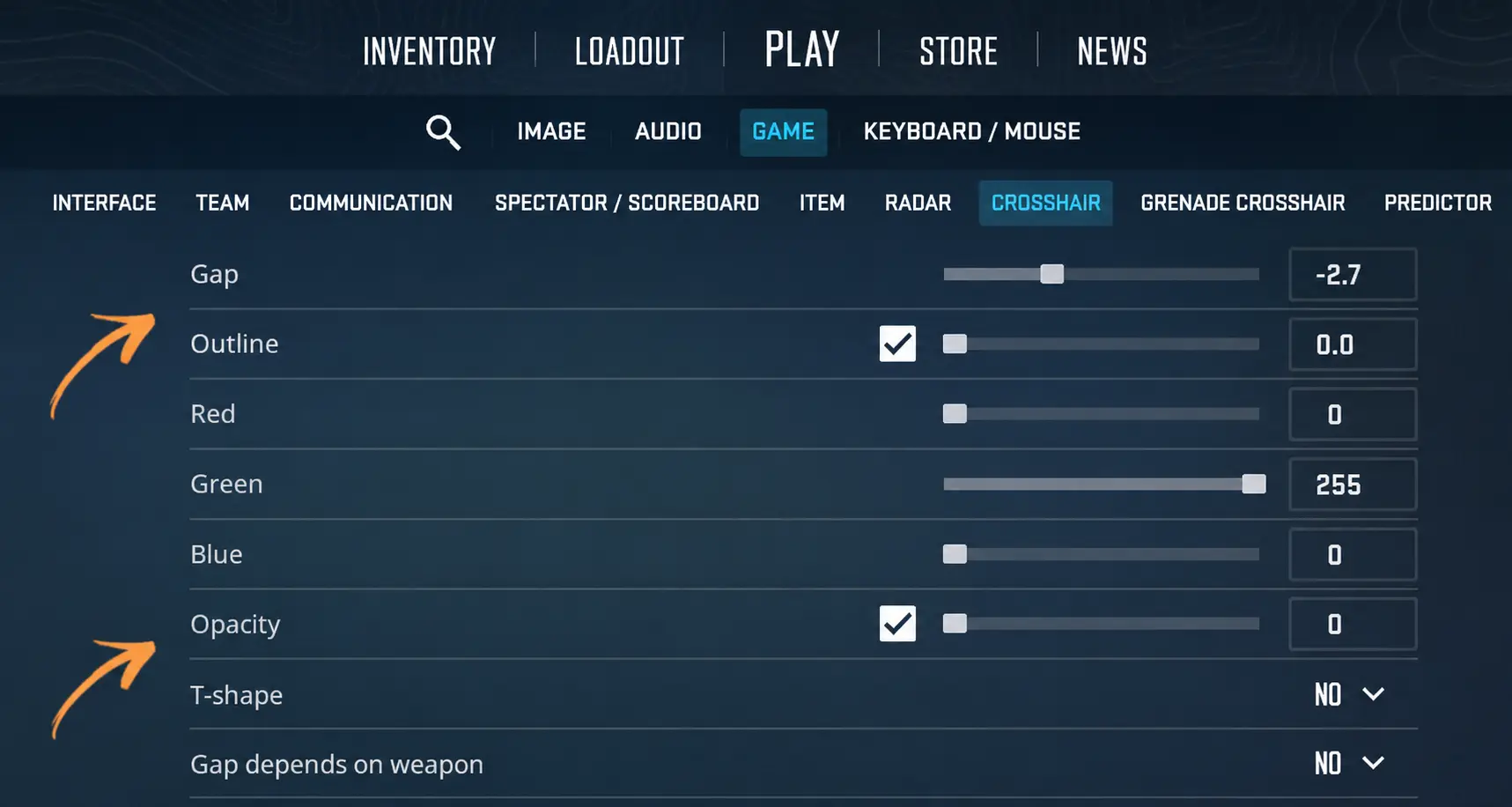
- Open Settings → Game → Crosshair.
- Set Opacity to 0 using the slider.
- If your crosshair has an outline, set the Outline value to 0 as well.
Your settings should look like this:
Additional Information
Keep in mind that sniper rifles such as the AWP, SSG 08, and others will still display their scoped crosshair even if the regular crosshair is disabled.
If you want to restore your crosshair, use the following command:
255 represents full opacity. You can also set any value between 0 and 255 to adjust the crosshair's transparency.
If you want to completely hide the entire CS2 interface, including the crosshair, weapon, timer, radar, and all other HUD elements, use the following command:
It is commonly used for recording videos or capturing clean gameplay footage.
In Conclusion
Disabling the default crosshair in CS2 is a convenient way to customize the game to your preferences, especially if you use external solutions for a custom crosshair or create gameplay content. It can also make the game more challenging and serve as a useful training method. Just remember how to enable the crosshair in CS2 again, so you don't end up without your interface in the middle of an important round.
Random CS2 Guides
Learn the most important CS2 terms, slang, that every Counter-Strike 2 player should know.