
Home Guides Settings Best CS2 Viewmodel Settings
Best CS2 Viewmodel Settings
15 May 2026

Best CS2 Viewmodel Settings & Hand Positions

Changing your viewmodel in CS2 affects much more than just the appearance of your weapon. A well-configured hand position can improve visibility, reduce visual clutter, and make the overall gameplay experience feel more comfortable.

This guide features popular CS2 viewmodel presets with ready-to-use console commands. You can quickly copy any setup into the console and test which weapon position works best for your playstyle.

Why Change Your Viewmodel in CS2?

The default weapon position in CS2 does not work perfectly for every player. Some players feel that the gun model blocks too much of the screen, while others prefer a more classic or minimal appearance.

Viewmodel commands allow you to change weapon distance, height, horizontal offset, and field of view. These settings help customize the game visually and make the screen feel cleaner during matches.

To apply any preset below, simply open the developer console in CS2 and paste the commands directly into the game.

Competitive Balance
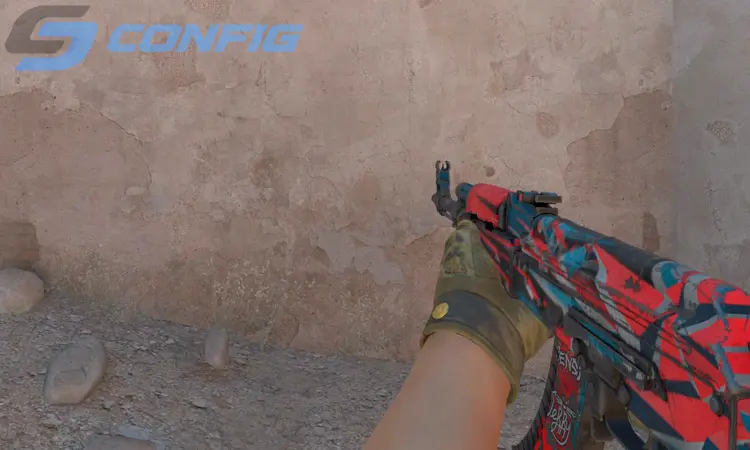
viewmodel_fov 68; viewmodel_offset_x 2.5; viewmodel_offset_y 0; viewmodel_offset_z -1.5; viewmodel_presetpos 3

Competitive Balance is one of the most universal viewmodel presets in CS2. The weapon stays in the lower-right corner while maintaining a balanced amount of screen visibility.

This setup is ideal for players who want a professional-looking configuration without extreme positioning. It works well in matchmaking, FACEIT, and competitive environments.

Minimal Screen Setup
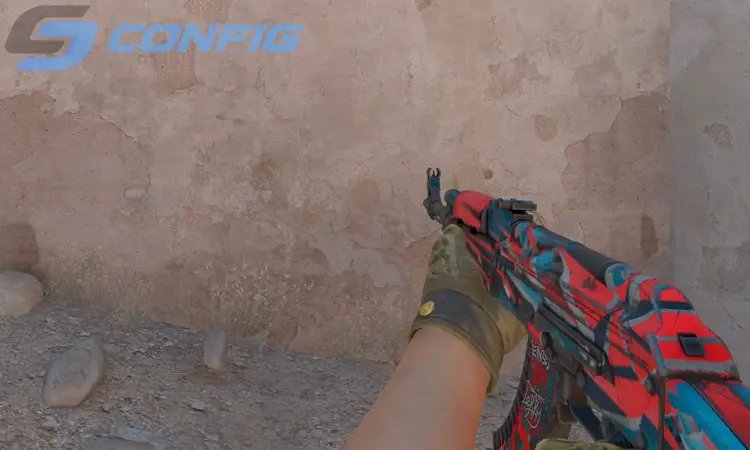
viewmodel_fov 68; viewmodel_offset_x 2.5; viewmodel_offset_y 2; viewmodel_offset_z -2; viewmodel_presetpos 0

Minimal Screen Setup pushes the weapon further away and lower on the screen, creating a cleaner overall image during gameplay.

This preset is especially popular among players using stretched resolutions because larger weapon models can sometimes feel distracting. If you prefer maximum visibility, this setup is a great choice.

Classic Counter-Strike Style
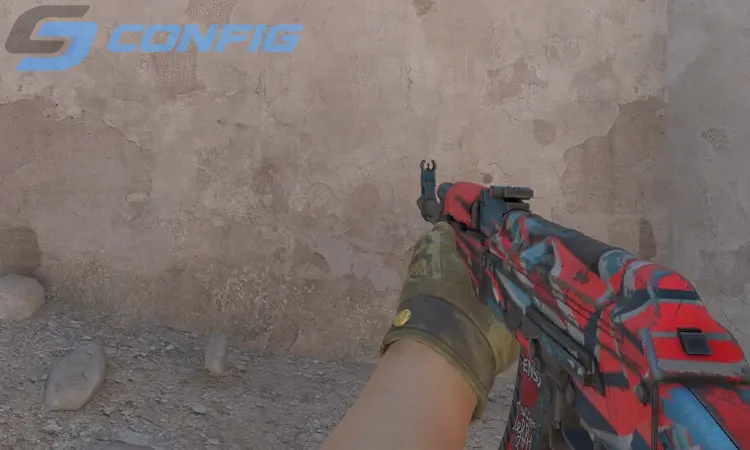
viewmodel_fov 60; viewmodel_offset_x 1; viewmodel_offset_y 1; viewmodel_offset_z -1; viewmodel_presetpos 1

Classic Counter-Strike Style recreates the old-school weapon positioning seen in previous versions of Counter-Strike. The weapon sits slightly closer to the center and feels more compact.

Although this setup does not provide the cleanest visibility, many longtime players enjoy the nostalgic feeling and familiar appearance it offers.

Cinematic Weapon View
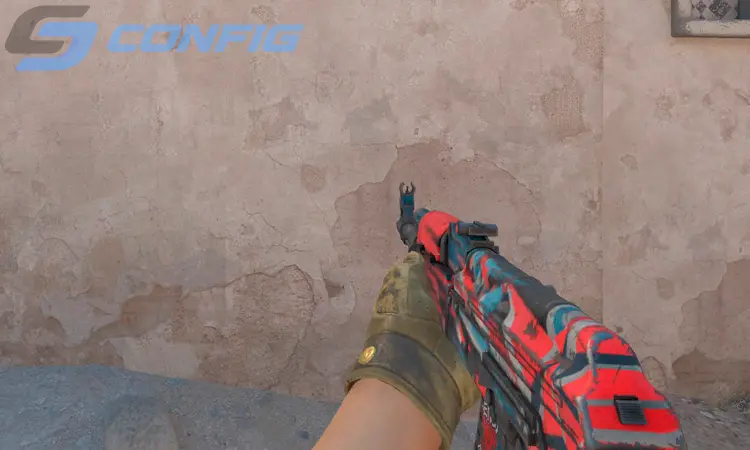
viewmodel_fov 60; viewmodel_offset_x 0; viewmodel_offset_y 1; viewmodel_offset_z -2; viewmodel_presetpos 0

Cinematic Weapon View creates a more dramatic and centered appearance. The weapon model becomes more noticeable and gives the game a unique visual style.

While this setup is not commonly used in high-level competitive play, it can look impressive on larger monitors and offers a refreshing alternative to standard viewmodels.

Extended Hand Position
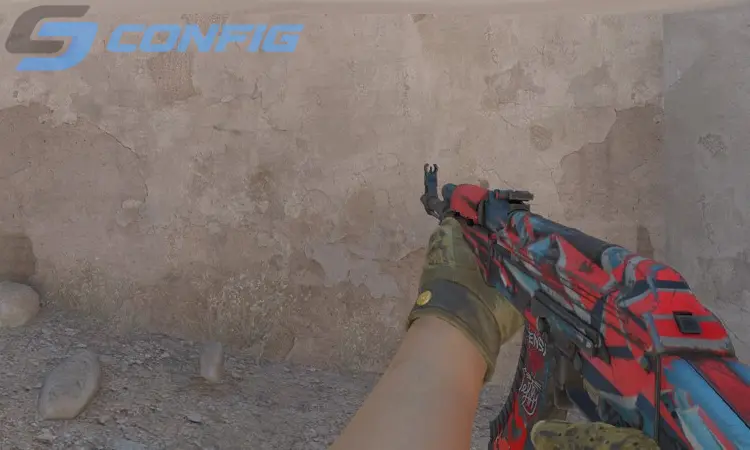
viewmodel_fov 68; viewmodel_offset_x 2.5; viewmodel_offset_y 2; viewmodel_offset_z -1.5; viewmodel_presetpos 0

Extended Hand Position places the weapon further from the camera, making the model appear smaller and less intrusive during gameplay.

This preset is especially useful for AWP players and users who want a wider and cleaner visual experience while holding angles.

High Weapon Placement
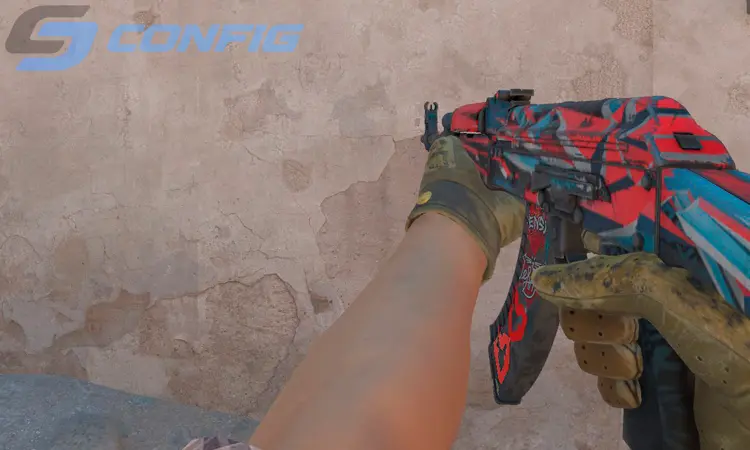
viewmodel_fov 68; viewmodel_offset_x 2.5; viewmodel_offset_y 2; viewmodel_offset_z 2; viewmodel_presetpos 0

High Weapon Placement moves the weapon model upward, making skins and animations more visible during gameplay.

Although this setup can reduce visibility slightly, many players enjoy it because it highlights weapon details and creates a more stylish appearance.

Centered Viewmodel
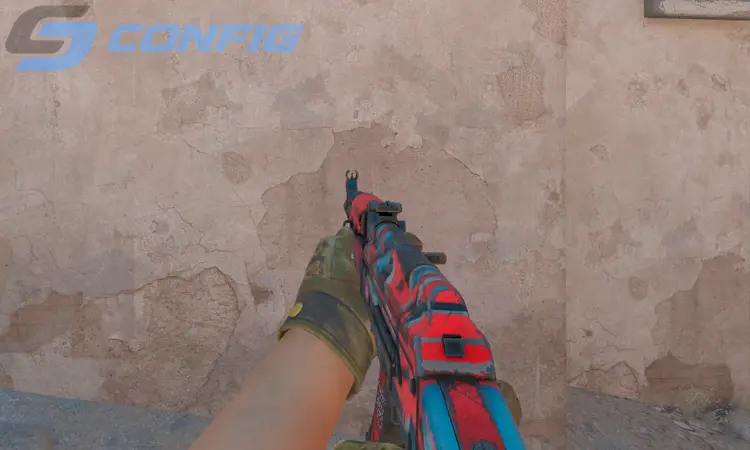
viewmodel_fov 68; viewmodel_offset_x -2; viewmodel_offset_y 2; viewmodel_offset_z -2; viewmodel_presetpos 0

Centered Viewmodel shifts the weapon closer to the middle of the screen, creating a very different visual experience compared to traditional setups.

This configuration is mainly used by players who prefer symmetrical visuals or enjoy experimenting with unusual hand positions in CS2.

Hidden Weapon Layout
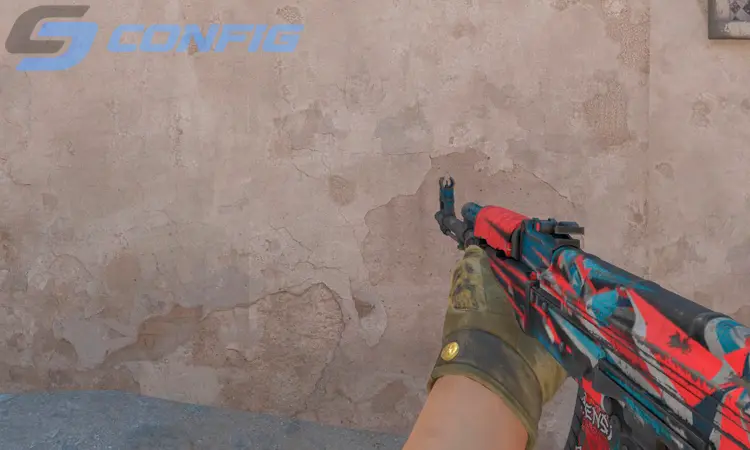
viewmodel_fov 68; viewmodel_offset_x 2.5; viewmodel_offset_y -2; viewmodel_offset_z -2; viewmodel_presetpos 0

Hidden Weapon Layout keeps the weapon model as far away from the center of the screen as possible. It minimizes distractions and creates a very clean gameplay experience.


This setup is perfect for players who prioritize visibility above everything else, especially on lower resolutions or smaller monitors.

Which CS2 Viewmodel Should You Choose?

If you are unsure where to start, try Competitive Balance or Minimal Screen Setup. These presets offer the best balance between visibility and comfort for most players.

The best CS2 viewmodel depends on your resolution, monitor size, and personal preference. Testing multiple presets is the best way to find the perfect setup for your gameplay.

FAQ - CS2 Viewmodel Questions

?

How do I change my hand position in CS2?

Open the developer console in CS2 and paste the viewmodel commands directly into the game. The weapon position will update instantly.
?

What is the best viewmodel in CS2?

Most competitive players prefer setups with viewmodel_fov 68 because they provide better visibility and reduce screen clutter.
?

Does viewmodel affect recoil or accuracy?

No, viewmodel settings only change the visual position of your weapon. They do not affect recoil, spray patterns, or weapon accuracy.
?

Can I reset my CS2 viewmodel settings?

Yes, you can restore the default settings using viewmodel_presetpos 1 or by resetting the commands manually.
?

Why do pro players use custom viewmodels?

Professional players customize their viewmodels to improve visibility, reduce distractions, and create a more comfortable playing environment.

Conclusion

CS2 viewmodel settings are highly personal and can dramatically change how the game feels. Some players prefer minimal weapon visibility, while others enjoy classic or centered weapon placements.

Try several presets from this guide and choose the one that feels the most natural for your gameplay, aim, and overall screen visibility.

Закрыть
Team Vitality CS2 Settings Vitality Team FURIA CS2 Settings FURIA Team Natus Vincere CS2 Settings Natus Vincere Team Falcons CS2 Settings Falcons Team PARIVISION CS2 Settings PARIVISION Team MOUZ CS2 Settings MOUZ Team The MongolZ CS2 Settings The MongolZ Team Spirit CS2 Settings Spirit Team Astralis CS2 Settings Astralis Team FaZe CS2 Settings FaZe Team G2 CS2 Settings G2 Team FUT CS2 Settings FUT Team Legacy CS2 Settings Legacy Team 3DMAX CS2 Settings 3DMAX Team Aurora CS2 Settings Aurora Team HEROIC CS2 Settings HEROIC Team 9z CS2 Settings 9z Team Liquid CS2 Settings Liquid Team paiN CS2 Settings paiN Team B8 CS2 Settings B8 Team TYLOO CS2 Settings TYLOO Team GamerLegion CS2 Settings GamerLegion Team Monte CS2 Settings Monte Team Ninjas in Pyjamas CS2 Settings Ninjas in Pyjamas Team NRG CS2 Settings NRG Team Gentle Mates CS2 Settings Gentle Mates Team SINNERS CS2 Settings SINNERS Team BetBoom CS2 Settings BetBoom Team HOTU CS2 Settings HOTU Team Passion UA CS2 Settings Passion UA Team BIG CS2 Settings BIG Team Alliance CS2 Settings Alliance Team Imperial CS2 Settings Imperial Team M80 CS2 Settings M80 Team 100 Thieves CS2 Settings 100 Thieves Team Sharks CS2 Settings Sharks Team EYEBALLERS CS2 Settings EYEBALLERS Team BC.Game CS2 Settings BC.Game Team Lynn Vision CS2 Settings Lynn Vision Team OG CS2 Settings OG Team illwill CS2 Settings illwill Team MIBR CS2 Settings MIBR Team ECSTATIC CS2 Settings ECSTATIC Team K27 CS2 Settings K27 Team fnatic CS2 Settings fnatic Team Tricked CS2 Settings Tricked Team 9INE CS2 Settings 9INE Team BESTIA CS2 Settings BESTIA Team Clutchain CS2 Settings Clutchain Team FOKUS CS2 Settings FOKUS Team Voca CS2 Settings Voca Team Betclic CS2 Settings Betclic Team Gaimin Gladiators CS2 Settings Gaimin Gladiators Team Inner Circle CS2 Settings Inner Circle Team FlyQuest CS2 Settings FlyQuest Team Famalicão CS2 Settings Famalicão Team Marsborne CS2 Settings Marsborne Team Nemiga CS2 Settings Nemiga Team Acend CS2 Settings Acend Team RED Canids CS2 Settings RED Canids Team Eternal Fire CS2 Settings Eternal Fire Team ShindeN CS2 Settings ShindeN Team ODDIK CS2 Settings ODDIK Team WW Team CS2 Settings WW Team Team BET-M CS2 Settings BET-M Team SPARTA CS2 Settings SPARTA Team Nemesis CS2 Settings Nemesis Team Johnny Speeds CS2 Settings Johnny Speeds Team magic CS2 Settings magic Team The Huns CS2 Settings The Huns Team NEW VISION CS2 Settings NEW VISION Team JiJieHao CS2 Settings JiJieHao Team THUNDER dOWNUNDER CS2 Settings THUNDER dOWNUNDER Team AM Gaming CS2 Settings AM Gaming Team Galorys CS2 Settings Galorys Team Nuclear TigeRES CS2 Settings Nuclear TigeRES Team SemperFi CS2 Settings SemperFi Team Wildcard CS2 Settings Wildcard Team Fluxo CS2 Settings Fluxo Team FAVBET CS2 Settings FAVBET Team Phantom CS2 Settings Phantom Team 1WIN CS2 Settings 1WIN Team Sashi CS2 Settings Sashi Team MOUZ NXT CS2 Settings MOUZ NXT Team CYBERSHOKE CS2 Settings CYBERSHOKE Team MANA CS2 Settings MANA Team LAG CS2 Settings LAG Team AaB Esport CS2 Settings AaB Esport Team Metizport CS2 Settings Metizport Team Chinggis Warriors CS2 Settings Chinggis Warriors Team ARCRED CS2 Settings ARCRED Team Virtus.pro CS2 Settings Virtus.pro Team TNC CS2 Settings TNC Team KOLESIE CS2 Settings KOLESIE Team Rare Atom CS2 Settings Rare Atom Team Fisher College CS2 Settings Fisher College Team Rebels CS2 Settings Rebels Team HyperSpirit CS2 Settings HyperSpirit Team Young Ninjas CS2 Settings Young Ninjas Team BOSS CS2 Settings BOSS Team Oxuji CS2 Settings Oxuji Team Bounty Hunters CS2 Settings Bounty Hunters Team Leo CS2 Settings Leo Team Ursa CS2 Settings Ursa Team HEROIC Academy CS2 Settings HEROIC Academy Team aimclub CS2 Settings aimclub Team M1X KS CS2 Settings M1X KS Team Nexus CS2 Settings Nexus Team INFINITE CS2 Settings INFINITE Team Change The Game CS2 Settings Change The Game Team Omega CS2 Settings Omega Team Alter Ego CS2 Settings Alter Ego Team GameHunters CS2 Settings GameHunters Team ASTRAL CS2 Settings ASTRAL Team Yawara CS2 Settings Yawara Team BASEMENT BOYS CS2 Settings BASEMENT BOYS Team The Last Resort CS2 Settings The Last Resort Team Sangal CS2 Settings Sangal Team MASONIC CS2 Settings MASONIC Team SAW CS2 Settings SAW Team Lazer Cats CS2 Settings Lazer Cats Team RUSTEC CS2 Settings RUSTEC Team Isurus CS2 Settings Isurus Team HAVU CS2 Settings HAVU Team Keyd Stars CS2 Settings Keyd Stars Team The QUBE CS2 Settings The QUBE Team Wave CS2 Settings Wave Team UNiTY CS2 Settings UNiTY Team QUAZAR CS2 Settings QUAZAR Team Procyon CS2 Settings Procyon Team VP.Prodigy CS2 Settings VP.Prodigy Team Ground Zero CS2 Settings Ground Zero Team GenOne CS2 Settings GenOne Team DEPO CS2 Settings DEPO Team Rune Eaters CS2 Settings Rune Eaters Team MIBR Academy CS2 Settings MIBR Academy Team RED Canids Academy CS2 Settings RED Canids Academy Team Mindfreak CS2 Settings Mindfreak Team Rooster CS2 Settings Rooster Team Vitality Academy CS2 Settings Vitality Academy Team Younglings CS2 Settings Younglings Team Legion CS2 Settings Legion Team Arcade CS2 Settings Arcade Team ALGO CS2 Settings ALGO Team Lilmix CS2 Settings Lilmix Team Luminosity CS2 Settings Luminosity Team WROTBERRY CS2 Settings WROTBERRY Team NAVI Junior CS2 Settings NAVI Junior Team BRUTE CS2 Settings BRUTE Team Wanted Goons CS2 Settings Wanted Goons Team Atreides CS2 Settings Atreides Team los kogutos CS2 Settings los kogutos Team OlyBet CS2 Settings OlyBet Team bankaPEPSI CS2 Settings bankaPEPSI Team Chicken Coop CS2 Settings Chicken Coop Team Zomblers CS2 Settings Zomblers Team STATE CS2 Settings STATE Team UR CS2 Settings UR Team Aurora Young Blud CS2 Settings Aurora Young Blud Team Crashers CS2 Settings Crashers Team Diamant CS2 Settings Diamant Team regain CS2 Settings regain Team Misa CS2 Settings Misa Team Vasco CS2 Settings Vasco Team Patins da Ferrari CS2 Settings Patins da Ferrari Team Phantom Academy CS2 Settings Phantom Academy Team Revel CS2 Settings Revel Team SAW Youngsters CS2 Settings SAW Youngsters Team SINQU REHTI CS2 Settings SINQU REHTI Team BORING PLAYERS CS2 Settings BORING PLAYERS Team G2 Ares CS2 Settings G2 Ares Team ENCE CS2 Settings ENCE Team Eternal Fire Academy CS2 Settings Eternal Fire Academy Team Steel Helmet CS2 Settings Steel Helmet Team INFURITY CS2 Settings INFURITY Team Detonate CS2 Settings Detonate Team ReThink CS2 Settings ReThink Team CTRL CS2 Settings CTRL Team Inner Circle Academy CS2 Settings Inner Circle Academy Team Butterfly CS2 Settings Butterfly Team FORZE Reload CS2 Settings FORZE Reload Team WBT CS2 Settings WBT Team Foxtrot CS2 Settings Foxtrot Team METANOIA Wolves CS2 Settings METANOIA Wolves Team Iowa Stormboar CS2 Settings Iowa Stormboar Team BAKS CS2 Settings BAKS Team Hermine CS2 Settings Hermine Team A Great Chaos CS2 Settings A Great Chaos Team Echo CS2 Settings Echo Team EAC CS2 Settings EAC Team NuTorious CS2 Settings NuTorious Team SD Invicta CS2 Settings SD Invicta Team DONSTU CS2 Settings DONSTU Team Ascend CS2 Settings Ascend Team Homyno CS2 Settings Homyno Team Fire Flux CS2 Settings Fire Flux Team Evo Novo CS2 Settings Evo Novo Team Hacha CS2 Settings Hacha Team ScarX CS2 Settings ScarX Team TDK CS2 Settings TDK Team Entropy CS2 Settings Entropy Team Black Phoenix CS2 Settings Black Phoenix Team PCIFIC CS2 Settings PCIFIC Team Walczaki CS2 Settings Walczaki Team ODDIK Academy CS2 Settings ODDIK Academy Team Trainwrecks CS2 Settings Trainwrecks Team OKSUCC CS2 Settings OKSUCC Team Time Waves CS2 Settings Time Waves Team Orda CS2 Settings Orda Team Endless Journey CS2 Settings Endless Journey Team DENDELE CS2 Settings DENDELE Team MASQ CS2 Settings MASQ Team Third Prime CS2 Settings Third Prime Team Nordic Partners CS2 Settings Nordic Partners