
Home Guides Settings How to Enable Grenade Guide in CS2

How to Enable Grenade Guide in CS2
13 April 2026

How to Enable Grenade Guide in CS2 - Full Guide & Tips

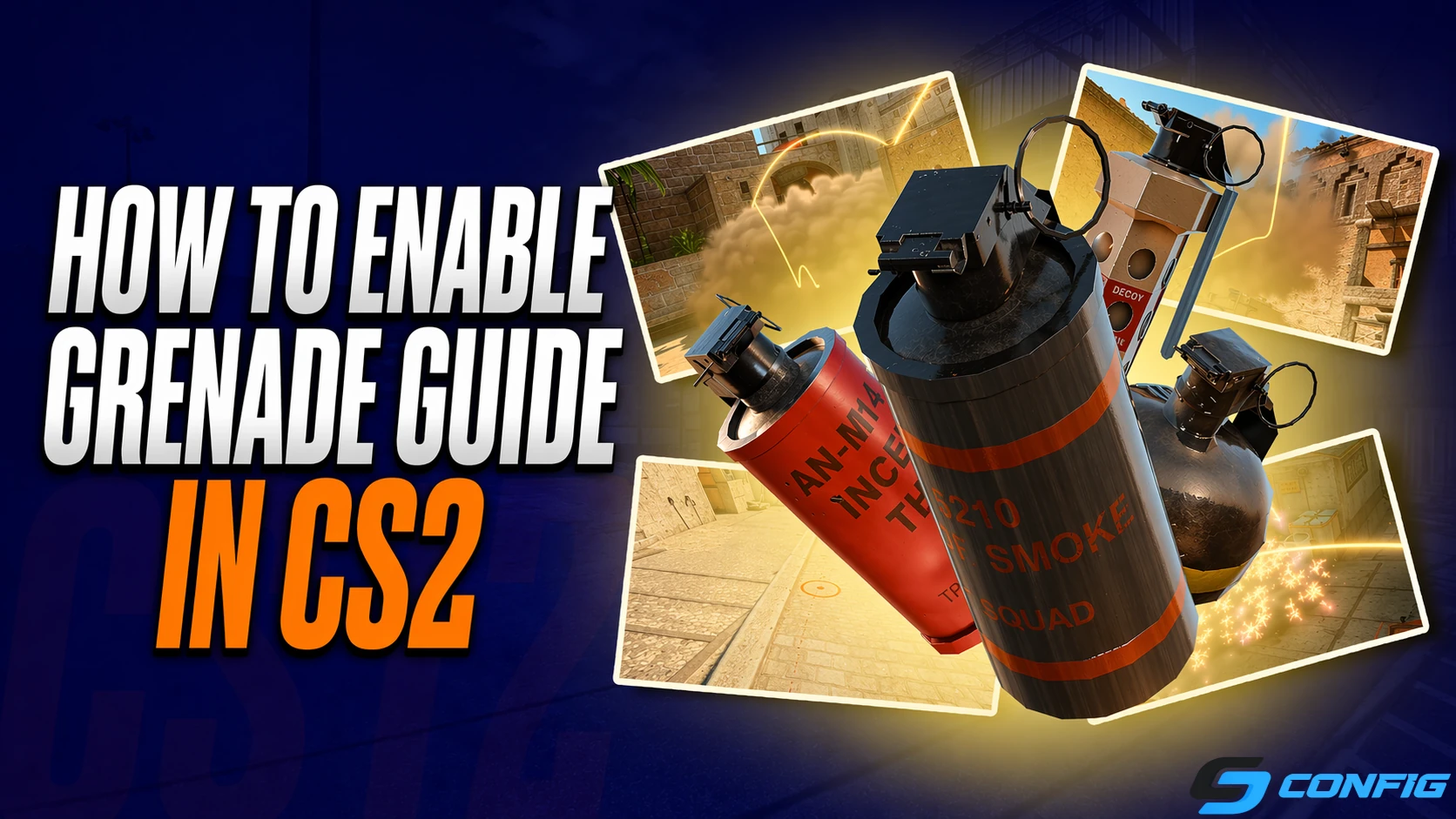
In Counter-Strike 2, a convenient grenade guide feature has been introduced, helping players quickly learn smokes, flashes, and molotovs. With this system, you can see ready-made grenade lineups directly during a match and use them without memorizing complex positions.

In this guide, we’ll explain how to enable the grenade guide in CS2, explore the different types of tips available, and show you how to use them effectively to improve your gameplay.

What is the grenade guide in CS2

The grenade guide in CS2 is a built-in training system that shows players how to properly use utility in real match situations. Instead of searching for lineups on YouTube or practicing on custom maps, you get ready-to-use tips directly during gameplay.

The game displays the grenade trajectory, the correct throwing position, and the exact aiming point. This allows you to quickly understand the mechanics and start using grenades more effectively from your very first matches.

How to enable the guide in CS2

Enabling the grenade guide takes only a few seconds and doesn’t require any additional setup or mods. Everything is available directly in the game interface.

  • Join a match
  • Press ESC to open the pause menu
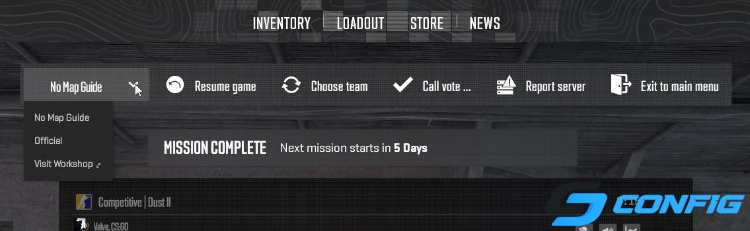
  • Find the guide selector next to the "Resume Game" button
  • Choose a guide (default or workshop)
  • Return to the game

After activation, the system will automatically display available grenade lineups on the current map. Keep in mind that you can switch guides depending on the map and your playstyle.

How the tips work

Once the guide is enabled in CS2, visual elements will appear on the map to help you execute throws correctly. This makes learning more intuitive and easier to understand. You will see the exact position where you need to stand, along with the precise point to aim at.


This system is especially useful in stressful situations where there’s no time to recall lineups. You simply follow the guide and perform the throw with maximum accuracy.

Console commands for grenade tips in CS2

If you want more control over grenade tips in CS2 or are setting up your own server, you can use specific console commands. These allow you to adjust restrictions and customize the behavior of the guide.

Main parameters:

  • sv_allow_annotations_access_level [0/1/2] - defines access level:
    0 - completely disables tips;
    1 - limited viewing access (default mode);
    2 - full access with the ability to create and edit custom annotations.
  • sv_annotation_limits_max_rounds_per_half [number] - sets how many rounds per side the tips are visible.
    Default value is 5.
    Setting -1 keeps tips active for the entire match.

Types of guides

There are two main types of guides available in the game. They differ in complexity and the number of available lineups. The choice depends on your skill level and goals.

Default guide

The default guide is the basic option provided by the developers. It is ideal for beginners and players who are just starting to learn maps. It covers key positions and helps you quickly understand essential smokes and flashes.

Workshop guides

Workshop guides are created by the community and often include more advanced and precise lineups used by professional players. These guides are more detailed and are better suited for experienced players.


They are especially useful if you want to improve your gameplay and use meta lineups effectively.

System limitations

Despite its usefulness, the grenade guide system has certain limitations. Tips are only available during the first 5 rounds of each half, meaning they won’t be accessible throughout the entire match and may vary depending on the map.

This restriction exists to maintain balance and prevent players from gaining a constant advantage. Therefore, it’s best to use the guide as a learning tool rather than relying on it permanently.

Why use grenade guides

Using grenade guides provides a significant advantage, especially during the early learning stages. You will quickly understand lineup logic and start applying it in real matches. It helps you learn smokes faster, reduces mistakes, and ultimately increases your chances of winning.


FAQ: Grenade Guide in CS2

?

How do I enable the grenade guide in CS2?

Press ESC during a match, select a guide near the "Resume Game" button, and return to the game.
?

Does the guide work in competitive mode?

Yes, but only during the first 5 rounds of each half.
?

Can I use custom guides?

Yes, you can select guides from the Steam Workshop with advanced lineups.
?

Why does the guide disappear mid-match?

This is a system limitation - tips are only available in the first 5 rounds of each half.
?

Is this feature suitable for beginners?

Yes, it’s one of the fastest ways to learn grenade usage and basic lineups.

Conclusion

Grenade tips in CS2 are a powerful and user-friendly tool that helps players quickly learn key lineups and improve their utility usage. With built-in guidance, you can not only master basic smokes and flashes but also understand how to apply them in real situations.

Despite some limitations, this feature is excellent for practice and match preparation. If you want to improve your gameplay, enhance teamwork, and reduce mistakes, make sure to use the grenade guide in CS2 and gradually memorize essential positions.

Закрыть
Team Vitality CS2 Settings Vitality Team FURIA CS2 Settings FURIA Team Natus Vincere CS2 Settings Natus Vincere Team Falcons CS2 Settings Falcons Team PARIVISION CS2 Settings PARIVISION Team MOUZ CS2 Settings MOUZ Team The MongolZ CS2 Settings The MongolZ Team Spirit CS2 Settings Spirit Team Astralis CS2 Settings Astralis Team FaZe CS2 Settings FaZe Team G2 CS2 Settings G2 Team FUT CS2 Settings FUT Team Legacy CS2 Settings Legacy Team 3DMAX CS2 Settings 3DMAX Team Aurora CS2 Settings Aurora Team HEROIC CS2 Settings HEROIC Team 9z CS2 Settings 9z Team Liquid CS2 Settings Liquid Team paiN CS2 Settings paiN Team B8 CS2 Settings B8 Team TYLOO CS2 Settings TYLOO Team GamerLegion CS2 Settings GamerLegion Team Monte CS2 Settings Monte Team Ninjas in Pyjamas CS2 Settings Ninjas in Pyjamas Team NRG CS2 Settings NRG Team Gentle Mates CS2 Settings Gentle Mates Team SINNERS CS2 Settings SINNERS Team BetBoom CS2 Settings BetBoom Team HOTU CS2 Settings HOTU Team Passion UA CS2 Settings Passion UA Team BIG CS2 Settings BIG Team Alliance CS2 Settings Alliance Team Imperial CS2 Settings Imperial Team M80 CS2 Settings M80 Team 100 Thieves CS2 Settings 100 Thieves Team Sharks CS2 Settings Sharks Team EYEBALLERS CS2 Settings EYEBALLERS Team BC.Game CS2 Settings BC.Game Team Lynn Vision CS2 Settings Lynn Vision Team OG CS2 Settings OG Team illwill CS2 Settings illwill Team MIBR CS2 Settings MIBR Team ECSTATIC CS2 Settings ECSTATIC Team K27 CS2 Settings K27 Team fnatic CS2 Settings fnatic Team Tricked CS2 Settings Tricked Team 9INE CS2 Settings 9INE Team BESTIA CS2 Settings BESTIA Team Clutchain CS2 Settings Clutchain Team FOKUS CS2 Settings FOKUS Team Voca CS2 Settings Voca Team Betclic CS2 Settings Betclic Team Gaimin Gladiators CS2 Settings Gaimin Gladiators Team Inner Circle CS2 Settings Inner Circle Team FlyQuest CS2 Settings FlyQuest Team Famalicão CS2 Settings Famalicão Team Marsborne CS2 Settings Marsborne Team Nemiga CS2 Settings Nemiga Team Acend CS2 Settings Acend Team RED Canids CS2 Settings RED Canids Team Eternal Fire CS2 Settings Eternal Fire Team ShindeN CS2 Settings ShindeN Team ODDIK CS2 Settings ODDIK Team WW Team CS2 Settings WW Team Team BET-M CS2 Settings BET-M Team SPARTA CS2 Settings SPARTA Team Nemesis CS2 Settings Nemesis Team Johnny Speeds CS2 Settings Johnny Speeds Team magic CS2 Settings magic Team The Huns CS2 Settings The Huns Team NEW VISION CS2 Settings NEW VISION Team JiJieHao CS2 Settings JiJieHao Team THUNDER dOWNUNDER CS2 Settings THUNDER dOWNUNDER Team AM Gaming CS2 Settings AM Gaming Team Galorys CS2 Settings Galorys Team Nuclear TigeRES CS2 Settings Nuclear TigeRES Team SemperFi CS2 Settings SemperFi Team Wildcard CS2 Settings Wildcard Team Fluxo CS2 Settings Fluxo Team FAVBET CS2 Settings FAVBET Team Phantom CS2 Settings Phantom Team 1WIN CS2 Settings 1WIN Team Sashi CS2 Settings Sashi Team MOUZ NXT CS2 Settings MOUZ NXT Team CYBERSHOKE CS2 Settings CYBERSHOKE Team MANA CS2 Settings MANA Team LAG CS2 Settings LAG Team AaB Esport CS2 Settings AaB Esport Team Metizport CS2 Settings Metizport Team Chinggis Warriors CS2 Settings Chinggis Warriors Team ARCRED CS2 Settings ARCRED Team Virtus.pro CS2 Settings Virtus.pro Team TNC CS2 Settings TNC Team KOLESIE CS2 Settings KOLESIE Team Rare Atom CS2 Settings Rare Atom Team Fisher College CS2 Settings Fisher College Team Rebels CS2 Settings Rebels Team HyperSpirit CS2 Settings HyperSpirit Team Young Ninjas CS2 Settings Young Ninjas Team BOSS CS2 Settings BOSS Team Oxuji CS2 Settings Oxuji Team Bounty Hunters CS2 Settings Bounty Hunters Team Leo CS2 Settings Leo Team Ursa CS2 Settings Ursa Team HEROIC Academy CS2 Settings HEROIC Academy Team aimclub CS2 Settings aimclub Team M1X KS CS2 Settings M1X KS Team Nexus CS2 Settings Nexus Team INFINITE CS2 Settings INFINITE Team Change The Game CS2 Settings Change The Game Team Omega CS2 Settings Omega Team Alter Ego CS2 Settings Alter Ego Team GameHunters CS2 Settings GameHunters Team ASTRAL CS2 Settings ASTRAL Team Yawara CS2 Settings Yawara Team BASEMENT BOYS CS2 Settings BASEMENT BOYS Team The Last Resort CS2 Settings The Last Resort Team Sangal CS2 Settings Sangal Team MASONIC CS2 Settings MASONIC Team SAW CS2 Settings SAW Team Lazer Cats CS2 Settings Lazer Cats Team RUSTEC CS2 Settings RUSTEC Team Isurus CS2 Settings Isurus Team HAVU CS2 Settings HAVU Team Keyd Stars CS2 Settings Keyd Stars Team The QUBE CS2 Settings The QUBE Team Wave CS2 Settings Wave Team UNiTY CS2 Settings UNiTY Team QUAZAR CS2 Settings QUAZAR Team Procyon CS2 Settings Procyon Team VP.Prodigy CS2 Settings VP.Prodigy Team Ground Zero CS2 Settings Ground Zero Team GenOne CS2 Settings GenOne Team DEPO CS2 Settings DEPO Team Rune Eaters CS2 Settings Rune Eaters Team MIBR Academy CS2 Settings MIBR Academy Team RED Canids Academy CS2 Settings RED Canids Academy Team Mindfreak CS2 Settings Mindfreak Team Rooster CS2 Settings Rooster Team Vitality Academy CS2 Settings Vitality Academy Team Younglings CS2 Settings Younglings Team Legion CS2 Settings Legion Team Arcade CS2 Settings Arcade Team ALGO CS2 Settings ALGO Team Lilmix CS2 Settings Lilmix Team Luminosity CS2 Settings Luminosity Team WROTBERRY CS2 Settings WROTBERRY Team NAVI Junior CS2 Settings NAVI Junior Team BRUTE CS2 Settings BRUTE Team Wanted Goons CS2 Settings Wanted Goons Team Atreides CS2 Settings Atreides Team los kogutos CS2 Settings los kogutos Team OlyBet CS2 Settings OlyBet Team bankaPEPSI CS2 Settings bankaPEPSI Team Chicken Coop CS2 Settings Chicken Coop Team Zomblers CS2 Settings Zomblers Team STATE CS2 Settings STATE Team UR CS2 Settings UR Team Aurora Young Blud CS2 Settings Aurora Young Blud Team Crashers CS2 Settings Crashers Team Diamant CS2 Settings Diamant Team regain CS2 Settings regain Team Misa CS2 Settings Misa Team Vasco CS2 Settings Vasco Team Patins da Ferrari CS2 Settings Patins da Ferrari Team Phantom Academy CS2 Settings Phantom Academy Team Revel CS2 Settings Revel Team SAW Youngsters CS2 Settings SAW Youngsters Team SINQU REHTI CS2 Settings SINQU REHTI Team BORING PLAYERS CS2 Settings BORING PLAYERS Team G2 Ares CS2 Settings G2 Ares Team ENCE CS2 Settings ENCE Team Eternal Fire Academy CS2 Settings Eternal Fire Academy Team Steel Helmet CS2 Settings Steel Helmet Team INFURITY CS2 Settings INFURITY Team Detonate CS2 Settings Detonate Team ReThink CS2 Settings ReThink Team CTRL CS2 Settings CTRL Team Inner Circle Academy CS2 Settings Inner Circle Academy Team Butterfly CS2 Settings Butterfly Team FORZE Reload CS2 Settings FORZE Reload Team WBT CS2 Settings WBT Team Foxtrot CS2 Settings Foxtrot Team METANOIA Wolves CS2 Settings METANOIA Wolves Team Iowa Stormboar CS2 Settings Iowa Stormboar Team BAKS CS2 Settings BAKS Team Hermine CS2 Settings Hermine Team A Great Chaos CS2 Settings A Great Chaos Team Echo CS2 Settings Echo Team EAC CS2 Settings EAC Team NuTorious CS2 Settings NuTorious Team SD Invicta CS2 Settings SD Invicta Team DONSTU CS2 Settings DONSTU Team Ascend CS2 Settings Ascend Team Homyno CS2 Settings Homyno Team Fire Flux CS2 Settings Fire Flux Team Evo Novo CS2 Settings Evo Novo Team Hacha CS2 Settings Hacha Team ScarX CS2 Settings ScarX Team TDK CS2 Settings TDK Team Entropy CS2 Settings Entropy Team Black Phoenix CS2 Settings Black Phoenix Team PCIFIC CS2 Settings PCIFIC Team Walczaki CS2 Settings Walczaki Team ODDIK Academy CS2 Settings ODDIK Academy Team Trainwrecks CS2 Settings Trainwrecks Team OKSUCC CS2 Settings OKSUCC Team Time Waves CS2 Settings Time Waves Team Orda CS2 Settings Orda Team Endless Journey CS2 Settings Endless Journey Team DENDELE CS2 Settings DENDELE Team MASQ CS2 Settings MASQ Team Third Prime CS2 Settings Third Prime Team Nordic Partners CS2 Settings Nordic Partners